
Validate the facility you want to assign services on to make sure spare channels exist. You can then copy the valid CFA so that you can paste it into the appropriate fields when you prepare the request.
Note: If you do not know the facility designation or type, do a CLLI scan first as described in the Scanning CLLI Codes section.
Click the Pre-Order tab.
Click the CFA Validation tab.
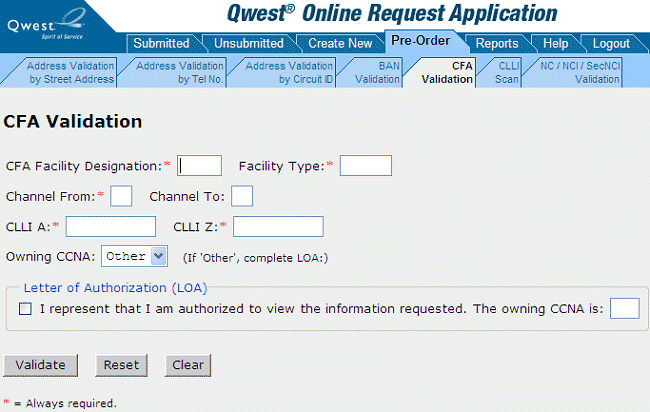
Fill in at least the required (*) fields.
Select the owning CCNA . If you select Other, fill out the Letter of Authorization (LOA) box by
selecting the check box
filling in the field for the owning CCNA
Click Validate. (Or you can reset or clear the form if needed and start over. See Resetting or Clearing a Pre-Order Form.)
Note: If you are not the owning CCNA for the facility, you will only be allowed to validate a single channel of the facility at one time.
Result: For each channel you specified, QORA™ lists the channel status, the pending activity and due date, and the ECCKT . If the system is able to retrieve the NC / NCI combination for the facility, that NC/NCI combination information appears at the top of the screen; otherwise, the message “NC/NCI combination unavailable” appears. Also, if any requested channel is busy, the CKR and PON of the ECCKT working in that channel will be displayed if available (as shown below).
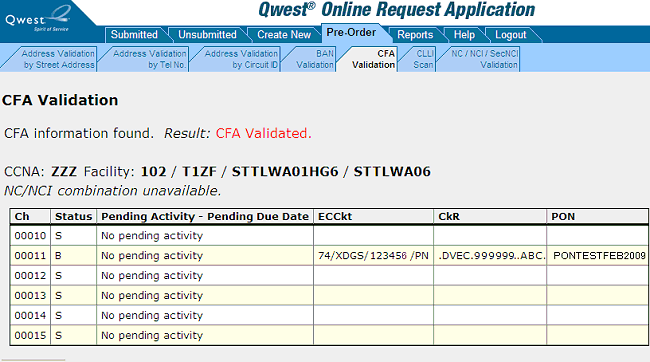
Select the valid CFA information for your request and copy it so that you can paste it into the appropriate fields when you prepare the request.