EASE VFO Data Search
Overview
EASE VFO houses CenturyLink Access Service Requests (ASRs). There are many ways to search for existing ASR order information in EASE VFO.
Data Search Objectives
Upon completion of this Module you can:
- Find order information using different search criteria by choosing the Search menu option from the Order tab.
- View the history of an order inlcuding Clarifications, Jeopardies, Completions, etc.
- Search for and modify existing templates.
Order Tab Search
You can perform a search in EASE VFO by selecting Search from the Order tab menu. Rolling your cursor over the Order tab displays the menu. When you click the Search menu option, an Order Search Page box displays with Purchase Order Number (PON) highlighted as the default search option.
You can choose to search by PON or select another search option. Once you select your search option, type your exact search criteria in the Search For: box to begin the query.
Exhibit 4.1.1—Search Box for ASR
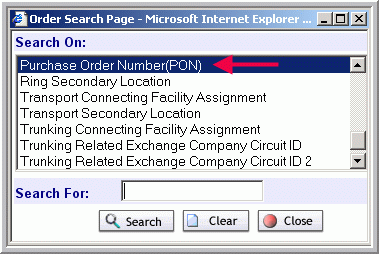 Following are some other search options:
- ACI Connecting Facility Assignment
- ASR Circuit Reference Number
- ASR Project ID
- ASR Two Six Code
- EUSA Secondary Location
- Initiator
- Multi-EC Order
- Ring Secondary Location
- Transport Connecting Facility Assignment
- Transport Secondary Location
- Trunking Connecting Facility Assignment
- Trunking Secondary Location
Wildcard Search
You can also perform a wildcard search by typing part of the PON number followed by a % in the Order Search Page box.
 Click the Document button to view a printable version of the EASE VFO Order tab search steps.
 Click the Simulation button to perform an ASR PON search and a wildcard search in EASE VFO.