
You can search for requests to continue processing them. Refer to the section on Record Retention in this document for information Qwest’s policy for retaining submitted ASRs in the database.
Click the Submitted or Unsubmitted tab, depending on which type of request you want to search for.
Specify how you want to view the requests. You must specify either a CCNA or a user, or you may specify both.
To view requests for specific PON text, enter part or all of the PON . For example, to display all requests with PONs containing the letter E, enter E in the PON field.
To view requests for a specific time frame, enter start and end dates in the fields.
To view requests created by a specific user, select the user.
By default, QORA™ lists the requests in descending order by date. To change the sort order, select the sort order you want from the list, and select either (descending) or (ascending).
Click Refresh List. QORA™ lists the requests that match your search criteria.
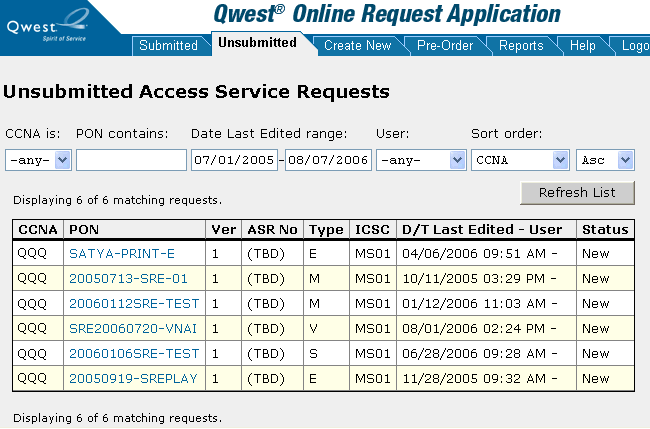
To open a particular request, click its PON .
|
You can now... |
Unsubmitted |
Submitted |
See... |
|
Edit the request |
X |
|
|
|
Restructure the request |
X |
|
|
|
Submit the request |
X |
|
|
|
Check the status of requests |
|
X |
|
|
Supplement a request |
|
X |
|
|
Delete the request |
X |
X |
|
|
Copy the request |
X |
X |
|
|
Print the request |
X |
X |