We no longer support this browser. For an optimal experience, we recommend updating your browser.

How to set up Connected Voice with Air-Line
Connected Voice has a lot to offer as your new home phone service. Let's get started by setting up your new Air-Line.
Video: Set up Air-Line for LTE connection
Setup with cellular (LTE) connection
Set up your Connected Voice with Air-Line with no pre-existing internet service by using a cellular (LTE) connection.
This is what you should find in the box:
- Connected Voice Air-Line LTE Adapter
- LTE Adapter stand
- Power cord
- 911 sticker
For setup with cellular service, you will need a regular RJ-11 phone cord.
You will receive a battery backup in a separate shipment.
For the best service, place the equipment near a window or exterior wall.
You can hang the adapter on the wall or use the included stand. To attach the stand, align it with the holes on the back of the adapter and slide the adapter into place.
1. Plug into power
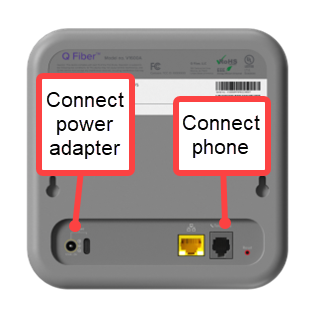
Plug the power cord into an outlet, then connect the power cord to the adapter.
2. Wait 5 minutes
Wait about five minutes for the adapter to boot up. The indicators on the front of the adapter will turn green when the initial boot-up is complete.
3. Connect a phone
Use a standard RJ-11 cord (not included with the adapter) to connect a touchtone telephone to the adapter.
Now you are ready to make and receive calls.
4. Connect the battery backup
A battery backup unit ensures you still have phone service during a power outage.
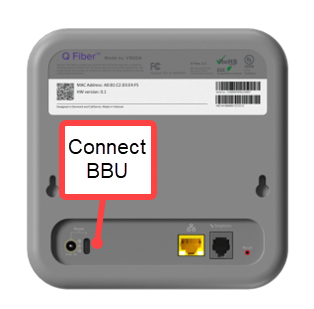
To connect it to your adapter, plug it into the USB-C port on the back of the adapter and then plug it into a wall outlet to keep it charged.
Set up your Connected Voice with Air-Line with your pre-existing internet service.
This is what you should find in the box:
- Connected Voice Air-Line LTE Adapter
- LTE Adapter stand
- Power cord
- 911 sticker
For setup with pre-existing internet, you will need an Ethernet cable as well as a telephone cord.
You will receive a battery backup in a separate shipment.
1. Plug into power
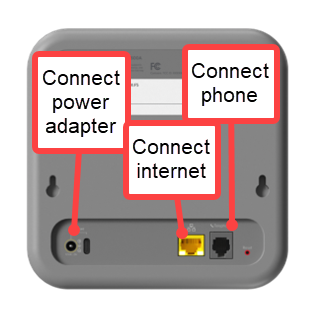
Place the Air-Line near your modem/router in a well-ventilated area and plug the adapter into a wall outlet.
2. Connect to router
Connect an Ethernet cable from the WAN (yellow) port on the adapter to your router/modem.
3. Connect your phone
Connect your telephone to the TEL (green) port.on the adapter with a telephone cord.
4. Wait 5-15 minutes
Wait 5-15 minutes while the device boots up and syncs to service.
5. Test calls
Try making a call from the phone as well as answering an incoming call to be sure everything works correctly.
6. Connect the battery backup
A battery backup unit ensures you still have phone service during a power outage.
If you use an internet provider other than CenturyLink, we cannot assist with issues related to that provider's service or equipment.
To connect it to your adapter, plug it into the USB-C port on the back of the adapter and then plug it into a wall outlet to keep it charged.
Sign in to your Connected Voice account
You'll receive a welcome email for your Connected Voice service. This email will include a username and a link to create your password. After you're signed in, you can view account details, call records, voicemail messages, and more.
If you didn't receive the email or have any other questions about setup, please contact us for help.

Top Internet Topics
-
Check for an outage -
Troubleshooting slow internet -
Speed hub -
Upgrade your service -
WiFi support -
Internet security
View all Internet topics
Top Tools


.png)

Was this information helpful?
Support topics



About Lumen | About CenturyLink | Careers | Investor Relations | Newsroom | Legal | Privacy Notice | Tariffs | Customers with Disabilities | Site Map | Cookie Settings | CenturyLink in Your Area | CenturyLink.net | Quantum Fiber in Your Area | White/Yellow Pages | Centurylink Retailer
Residential | Small Business | Enterprise | ©2025 CenturyLink. All Rights Reserved.